Follow any source
Bring news, specialist sites, and RSS feeds into one reader.
RSS reader + intelligence workspace
Your news and RSS feeds, organized in one reader. Follow sources, filter articles, and save what matters. Then go deeper with watchlist questions and cited intelligence briefings.
Free plan · No credit card required
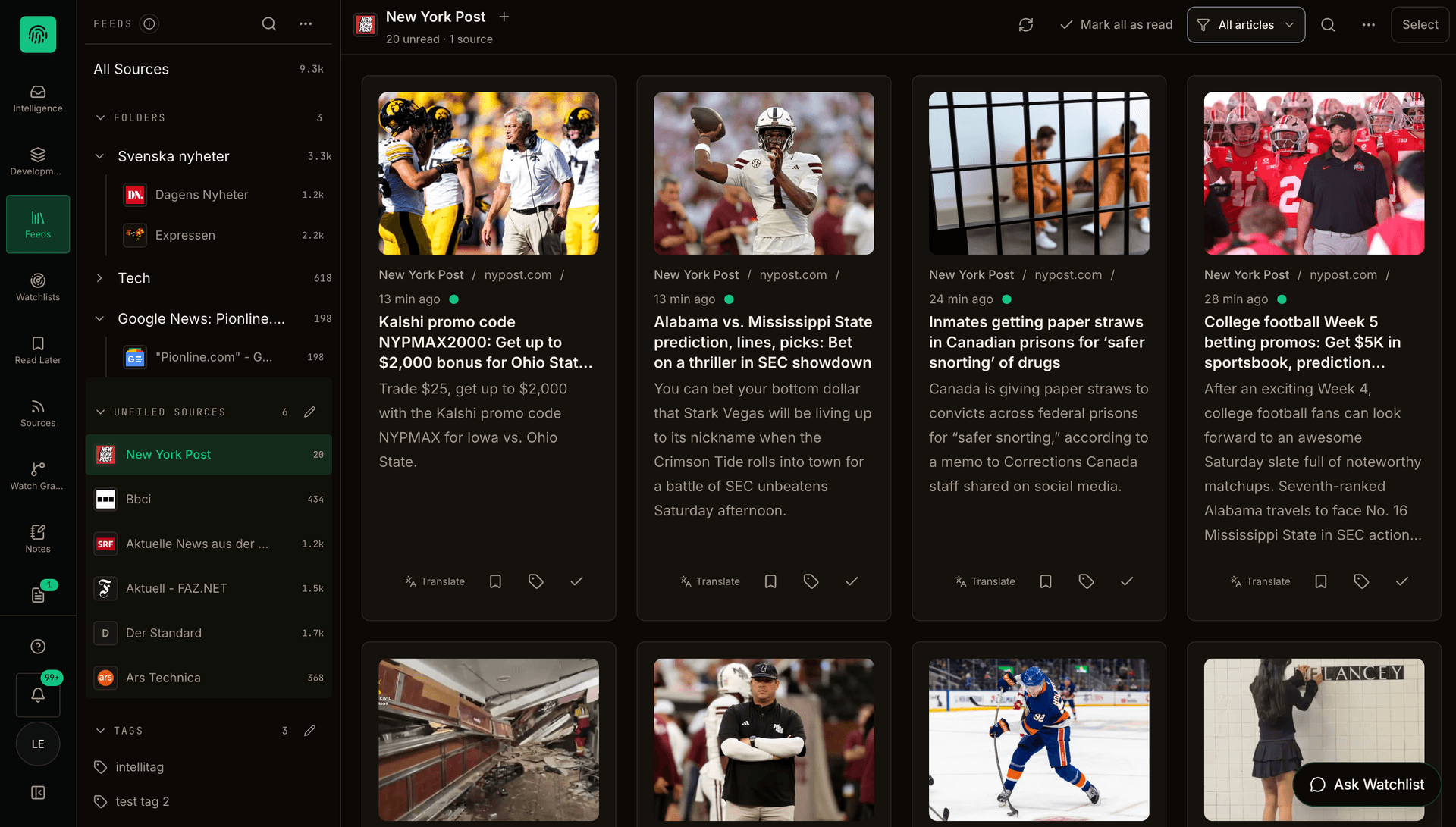
Follow your sources in one reader. Organize feeds into folders, scan articles, and save what deserves a closer read.
Real workspace capture · Example content and counts
Your feeds · Your watchlists · One workspace
Follow the sources you choose, keep your feeds organized, then ask questions across the reporting in a watchlist.
Bring news, specialist sites, and RSS feeds into one reader.
Keep sources and articles grouped around your interests.
See unread coverage as your followed sources publish.
Explore developments across the reporting you collect.
Get cited summaries and ask follow-up questions.
Move from an article to the wider story behind it.
Your sources, together
Bring technology, major newspapers, and international reporting into one reader. Start with curated collections or add your own websites and RSS feeds.
Websites, publications, and community feeds—all in one place.
Watchlists · Insights · Ask Watchlist
Monitor reporting across sources, spot changing patterns, and ask what the coverage means.
Bring coverage from many sources together.
See what is accelerating and changing.
Follow developments across countries and languages.
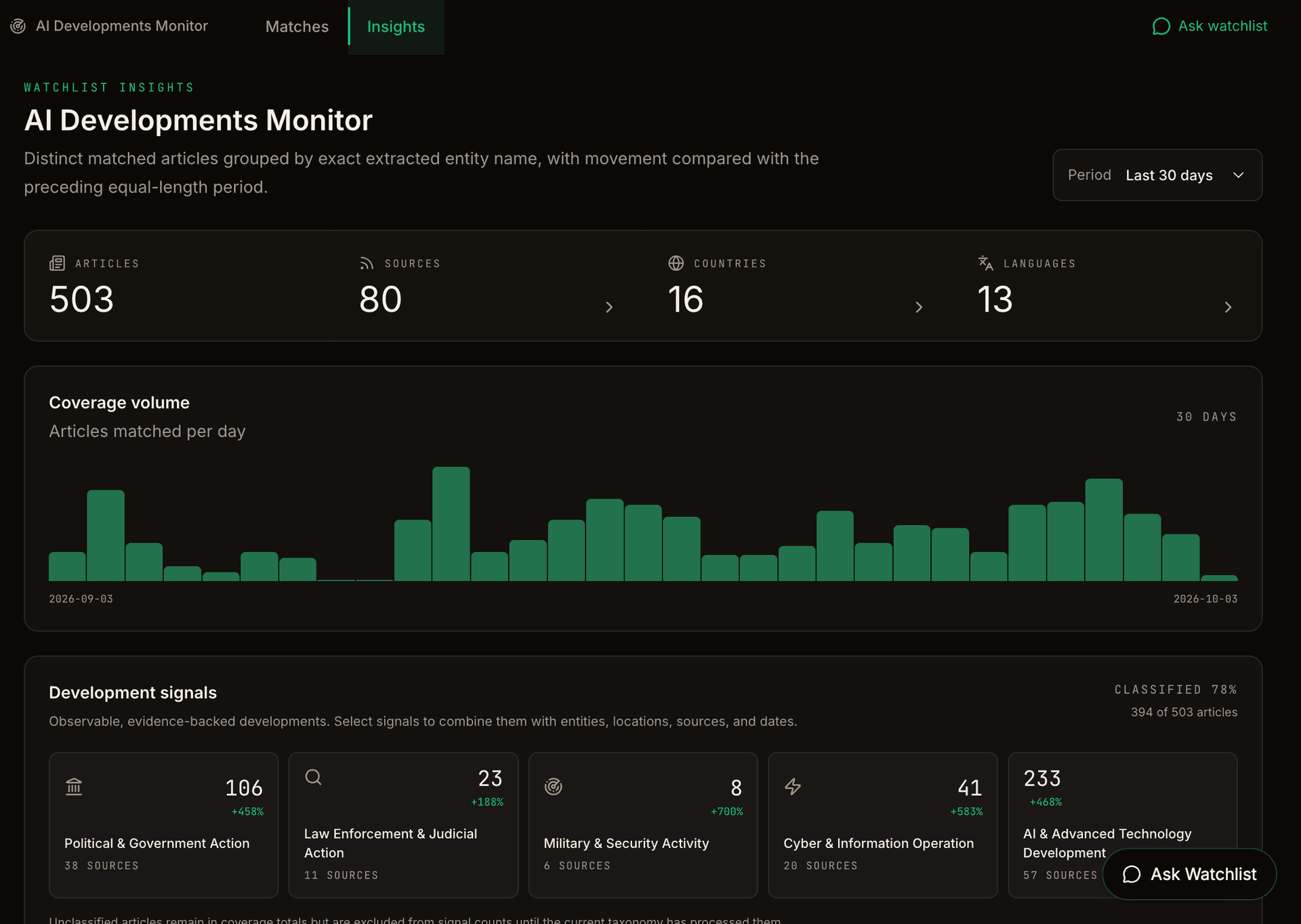
Make sense of reporting with watchlist analysis.
Explore signals across the coverage you follow.
Review coverage volume and classified developments.
Ask Watchlist · Ask Briefing
Explore ongoing coverage across a selected watchlist, or go deeper into one briefing and its cited sources.
Explore ongoing coverage collected for one selected watchlist.
Scope · One selected watchlist · Ongoing coverage
What changed across this week’s coverage?
A new requirement, with implementation still unclear.
The policy notice adds a documentation requirement. Industry reporting raises questions about how organizations should prepare. [1] [2]
The example sources do not confirm an enforcement timetable. Check subsequent official guidance before drawing a conclusion.
Fictional reporting, shown to explain the workflow. In your workspace, answers use available source material and identify limitations.
Examine one generated briefing and its cited sources.
Scope · One generated briefing · Its cited sources
Which sources support this point—and what remains unclear?
The dates refer to different milestones.
The policy notice describes the publication date. The industry response discusses preparation time, but does not establish an enforcement date. [1] [2]
The example sources do not confirm an enforcement timetable. Check subsequent official guidance before drawing a conclusion.
Fictional reporting, shown to explain the workflow. In your workspace, answers use available source material and identify limitations.
Use a watchlist to explore the wider reporting stream. Use a briefing to examine one prepared assessment.
Investigation canvas
Arrange people, organizations, projects, places, sources, and notes on a saved canvas. Add labeled connections to map how the information relates.
Create directed, labeled relationships between records.
Open linked articles, notes, and profiles from the canvas.
Arrange nodes, adjust the view, and save the canvas layout.
Organization
Northstar Energy
Project
Regional solar project
Source record
Planning update
Location
Northern Europe
01 / Your daily RSS reader
Find websites and RSS feeds, organize them in folders, filter unread articles, and save your reading list. Translate articles and add tags as you go.
Your chosen sources, folders, article cards, and Read Later.
Define a watchlist to collect reporting around an ongoing question.
Use Ask Watchlist to explore changes and compare source accounts.
Review a cited briefing, ask follow-ups, and keep useful answers.
Set the scope. Follow the signals.
Describe a company, topic, or ongoing question. Review suggested terms and source coverage before starting your watchlist. Insights then brings coverage patterns and classified developments into view—so you can decide what to investigate next.
Translate relevant reporting and keep its publisher context.
Save answers as editable working notes with their source references.
Configure automatic briefing emails or a daily digest around your workflow.
Questions worth following
Company monitoring
Bring company and industry reporting together, then examine the developments behind a briefing.
Geopolitical research
Compare regional and official reporting, with citations to inspect each account.
Investigative research
Question collected reporting and retain useful answers as working notes.
You can follow and organize sources in a familiar feed reader, then use watchlists to monitor topics, ask questions across collected reporting, and generate cited analytical briefings. Reading, questioning, and keeping useful findings happen in the same workspace.
Ask Watchlist explores reporting collected for a selected watchlist. Ask Briefing, labeled ‘Ask this briefing’ in the app, helps you examine one briefing and its supporting reporting. Generating a briefing is a separate step.
Answers use available source material and include citations for supported claims. Ask Watchlist can also use web research when enabled. Review source links, context, and any uncertainty notices; collected coverage is not an exhaustive record of everything published.
Yes. Follow news and RSS sources, organize feeds into folders, filter articles, use tags, and save items to read later. The intelligence tools extend that reading workflow.
Yes. Configure automatic briefing delivery or a daily digest in email preferences. You can also generate briefings on demand and send them manually. Availability depends on your settings and collected reporting.
Start with a free account and no credit card. Create your account, confirm your email when prompted, and choose your sources or set up your first watchlist.
From following to understanding
Choose sources, set your focus, and explore the reporting in one RSS reader and intelligence workspace.
Start freeFree plan · No credit card required